Chaos to Consistency
Design systems are pretty standard practice at this point, most teams know that once you’re shipping more than one product, inconsistency starts costing real time. CAADLAB just never had one. Over a few years we’d quietly shipped several separate tools — D-ART, D-ARE, D-DEM, D-PREDICT, D-Symbia, D-CodeWeaver, DesignSense+ — and every one of them had invented its own visual language from scratch. There was no consistency among products and no visual design guides to follow.
A design system isn’t a side project. It’s the thing that stops seven tools from inventing the same checkbox seven different ways.
A robust design system ensures consistency, fosters efficiency and supports future growth, and this was what was needed for the CAADLAB.
The problem
Everyone knew. Nobody was aligned.
Here’s the part people usually get wrong when I explain this: it wasn’t that nobody knew what everyone else was building. Everyone had seen everyone else’s tool — we talk, we sit in on each other’s demos. The frustrating part is where it actually showed up: the moment I put two screens side by side and started measuring. Button padding, corner radius, icon sizing — none of it agreed, anywhere, between any two tools. Everyone had seen D-Symbia. Nobody had checked what pixel value its buttons actually used. Knowing a tool exists and building to the same numbers as it are two completely different things, and there was no shared spec for anyone to check against, so “I’ve seen D-Symbia” never turned into “so I’ll reuse its spacing.” Everyone just kept building their own version, in good faith, pixel by pixel, from scratch.
And it wasn’t only a look-and-feel problem. When people actually sat down and used D-ART, a chunk of them got stuck on the exact same thing — they couldn’t tell what a number on screen actually meant. A commercial count of 7 — seven what? Two years and a completely different tool later, people using D-DEM ran into the identical confusion, just described in their own words. Two teams, two tools, solving the same comprehension problem from zero, because nothing ever carried over from the first time it got solved.
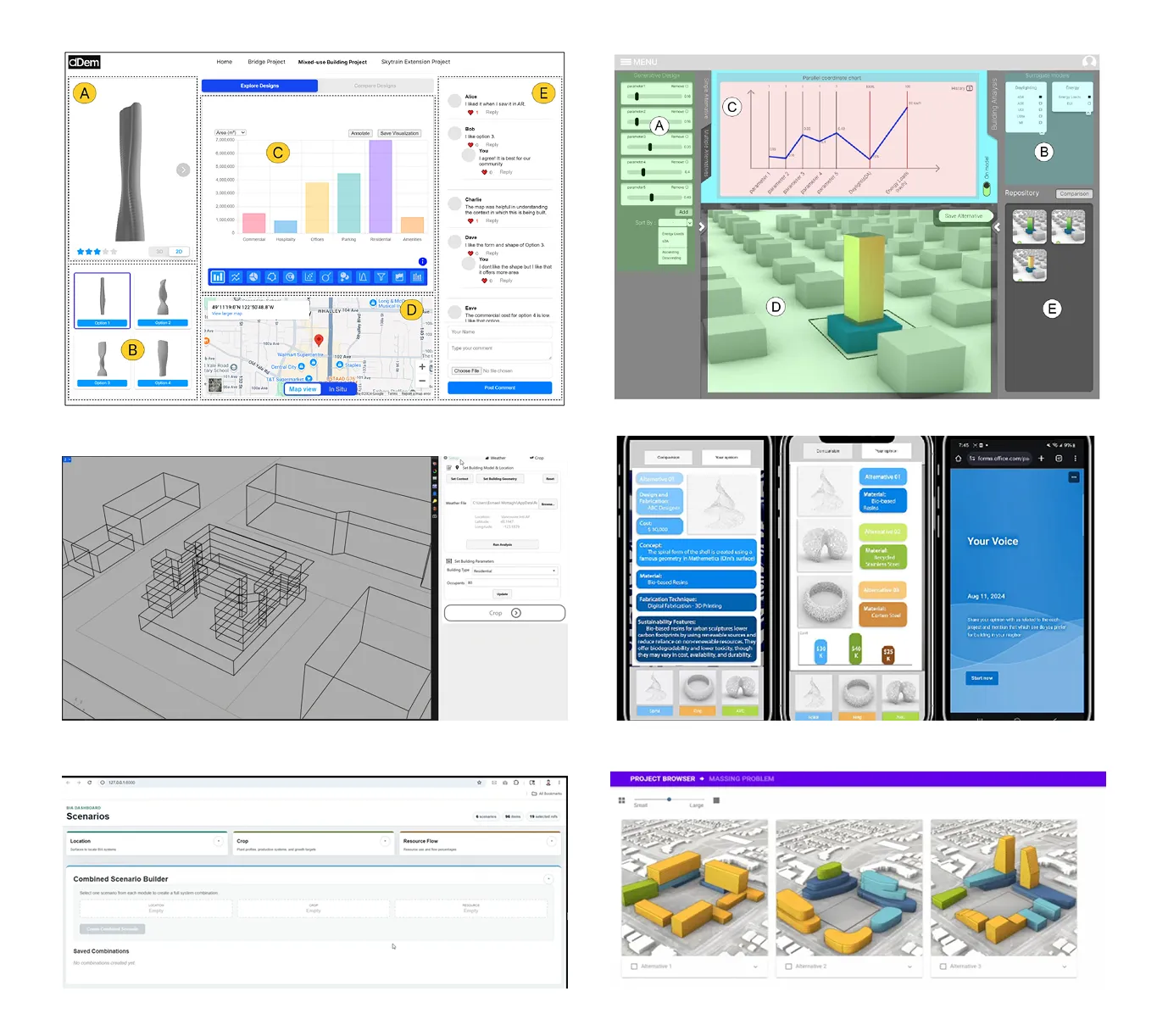
Multiply that by seven tools and you get seven different vocabularies for the same handful of problems: browsing options, filtering by criteria, comparing performance, leaving feedback. That’s the gap this project closes.
01. What I actually built
A shared component library and style guide, built directly in Figma and wired to design tokens — so any tool that adopts it inherits the same buttons, inputs, cards, and layout patterns automatically, while keeping whatever is genuinely unique to what it does. D-Symbia’s crop-simulation controls don’t need to look like D-DEM’s comment thread, and they still don’t.
- 0
- Atoms
- 0
- Molecules
- 0
- Organisms
- 0
- Icons
-
Style guide
One shared token system
A single brand blue instead of an unlabeled navy nobody had actually agreed on, one type scale, one spacing/radius/elevation scale — all as live Figma variables, not hardcoded hex values copy-pasted between files.
-
Component library
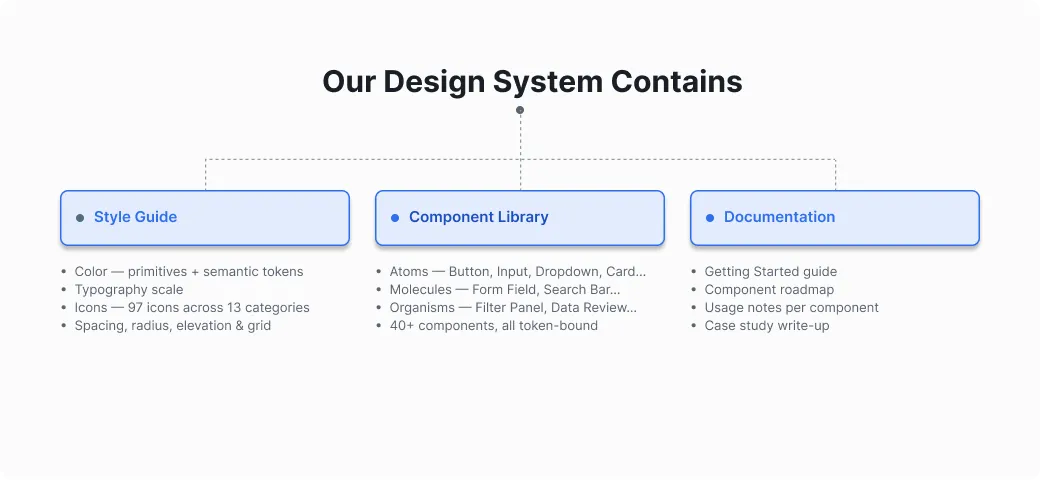
46 components, 97 icons
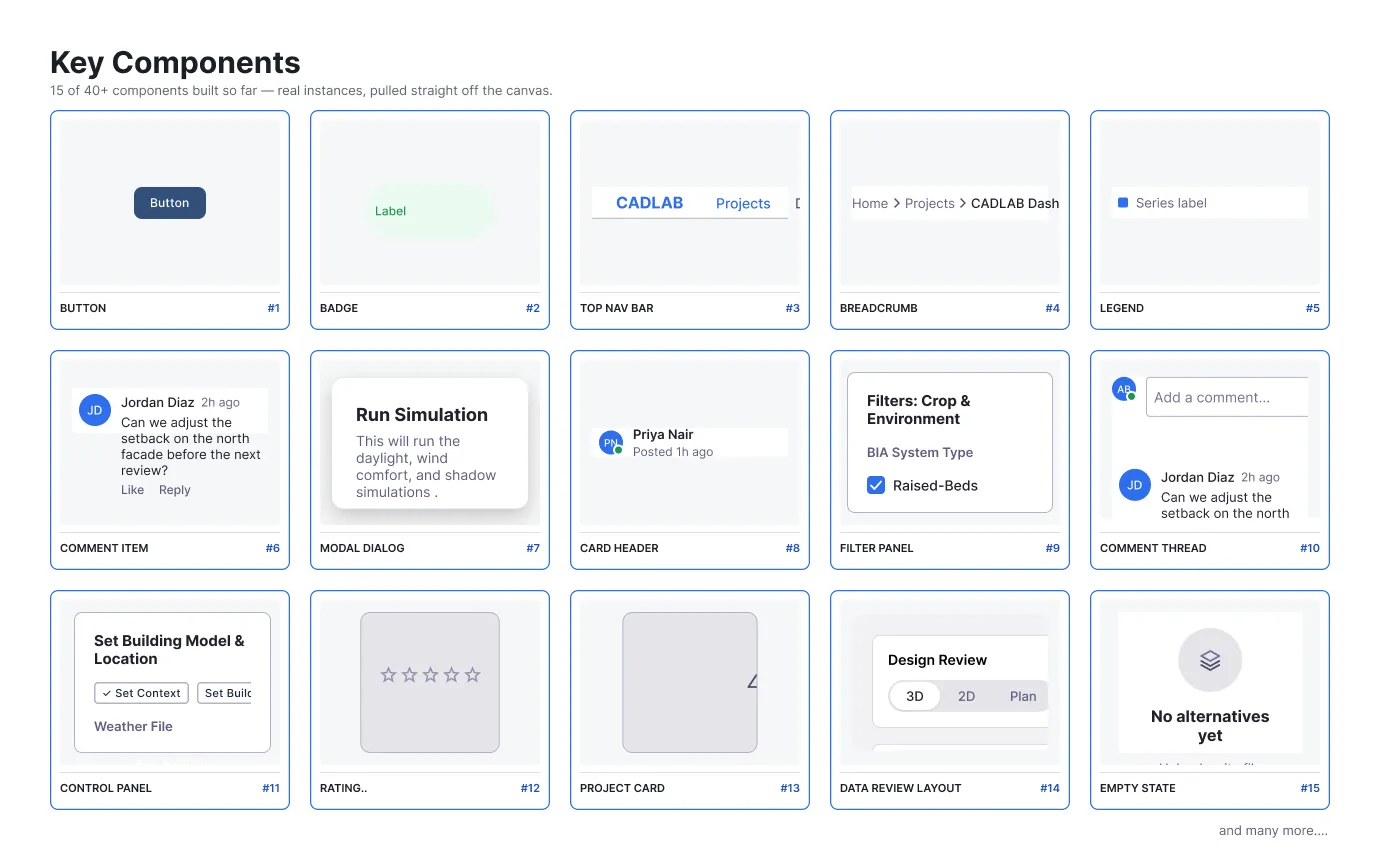
From a plain Button up through full layouts like the Filter Panel and Data Review Layout.
-
Documentation
The reasoning, not just the result
A living doc that explains why each piece exists, not just what it is — which real screen it came from, or why it's fair game to build broadly. So the next person doesn't have to guess, and a bad guess can actually get caught.
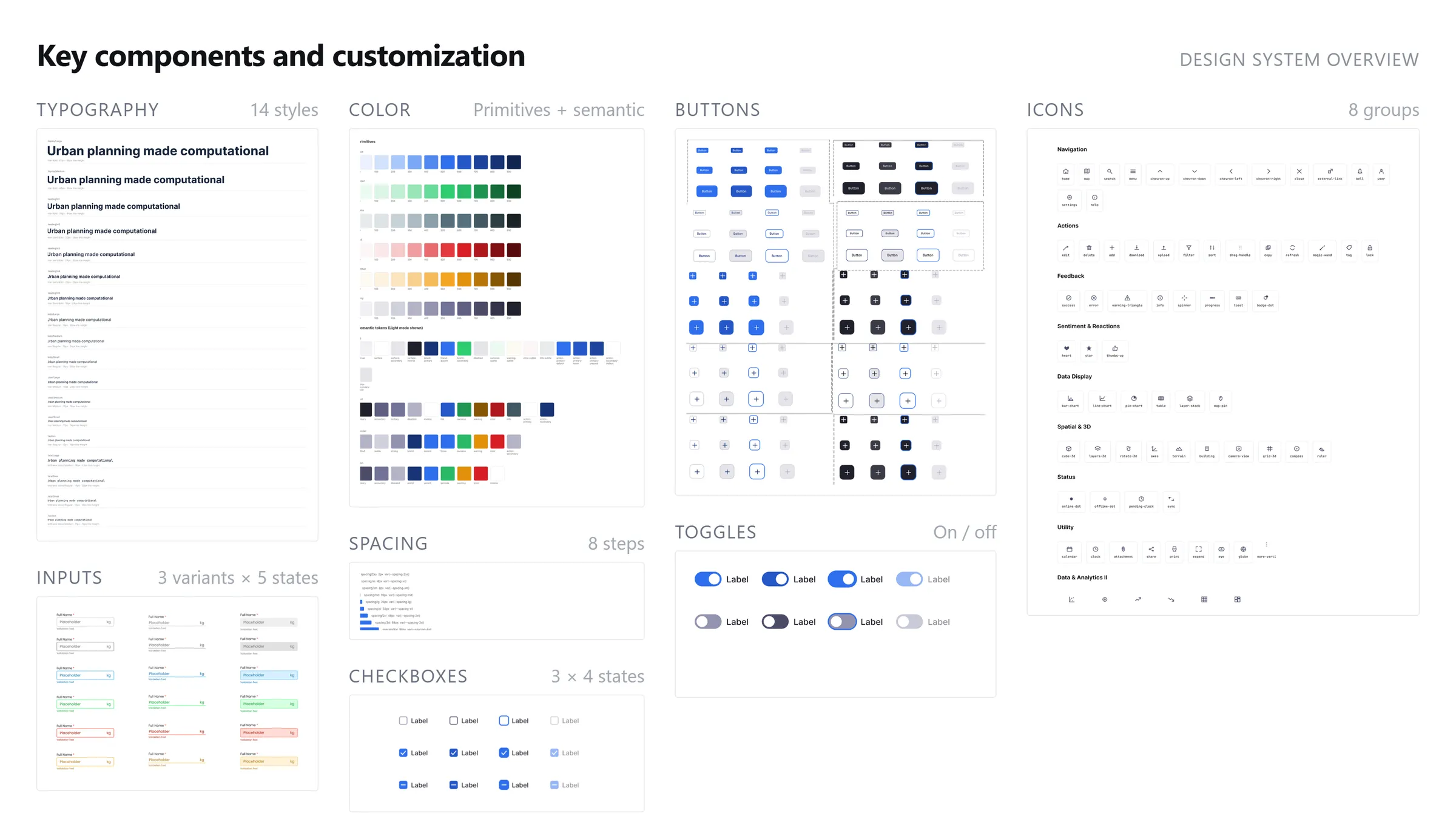
A look at what’s in it
46 components is a lot to show at once, so here’s a sample — the full set runs from primitive form controls up through page-level layouts.
02. The story
How this actually started
I’d been around the team long enough to watch this happen in real time — not as an outsider auditing someone else’s mess, but as a teammate watching one tool get built, then the next one landing in a totally different visual language a year later, then the one after that landing in a third. Nobody did anything wrong. There just wasn’t a shared reference for anyone to build toward.
This was built solo, over about three months, and “tools” here means more than just Figma: an AI coding agent (Claude) drove the Figma file directly through code — I described what I needed in plain language, and it built the tokens, components, and variants. That’s not something most design system case studies get to say. Every component in this library, every variant, every bound color token, every icon, was built by directing an agent that manipulated the Figma file live, not by me clicking through hundreds of variant combinations by hand. That freed up my actual time for the harder question: is this component real, or did I just build something that looks plausible?
Where the pushback actually was
Nobody had to be talked into this — when I brought it up, the reaction was closer to “yeah, obviously, why hasn’t this happened yet.” Everyone had already felt the cost of building their own version of the same thing. The real difficulty wasn’t getting buy-in, it was internal: figuring out where the line sits between what’s genuinely universal (a checkbox is a checkbox, no matter which tool it’s in) and what’s specific to one tool’s job and shouldn’t be flattened into sameness for its own sake. Get that line wrong either way and the system stops being useful — too rigid and it doesn’t fit anyone, too loose and it’s not really a system.
The spark
The moment that actually got me to sit down and start this: putting D-Symbia’s filter screen next to DesignSense+‘s filter screen. Same job — checkboxes and sliders to narrow down options — solved twice, with not one shared decision between them. Same interaction pattern, reinvented from scratch. That’s when this stopped being a “we should probably do this someday” and turned into three months of actual work.
03. The goal
-
Goal 01
Stay consistent without flattening anything
A dropdown or checkbox looks and behaves the same everywhere it shows up — but a tool's genuinely unique interaction stays exactly that.
-
Goal 02
Build the basics broadly, build up only with proof
Buttons, inputs, and other primitives are safe to build ahead of need. Anything more composed only gets built once I've actually seen the pattern repeat on a real screen — not because it seemed like reasonable UI grammar.
-
Goal 03
Fix the metrics-confusion problem once, system-wide
Since two completely different tools independently ran into people not understanding the numbers on screen, that's worth solving at the system level instead of per-tool.
-
Goal 04
Explain the reasoning, not just hand over the result
Every component's documentation says which real screen justified it, or why it's treated as universal — so the next person can tell a grounded decision from a guess.
04. How I actually figured out what to build
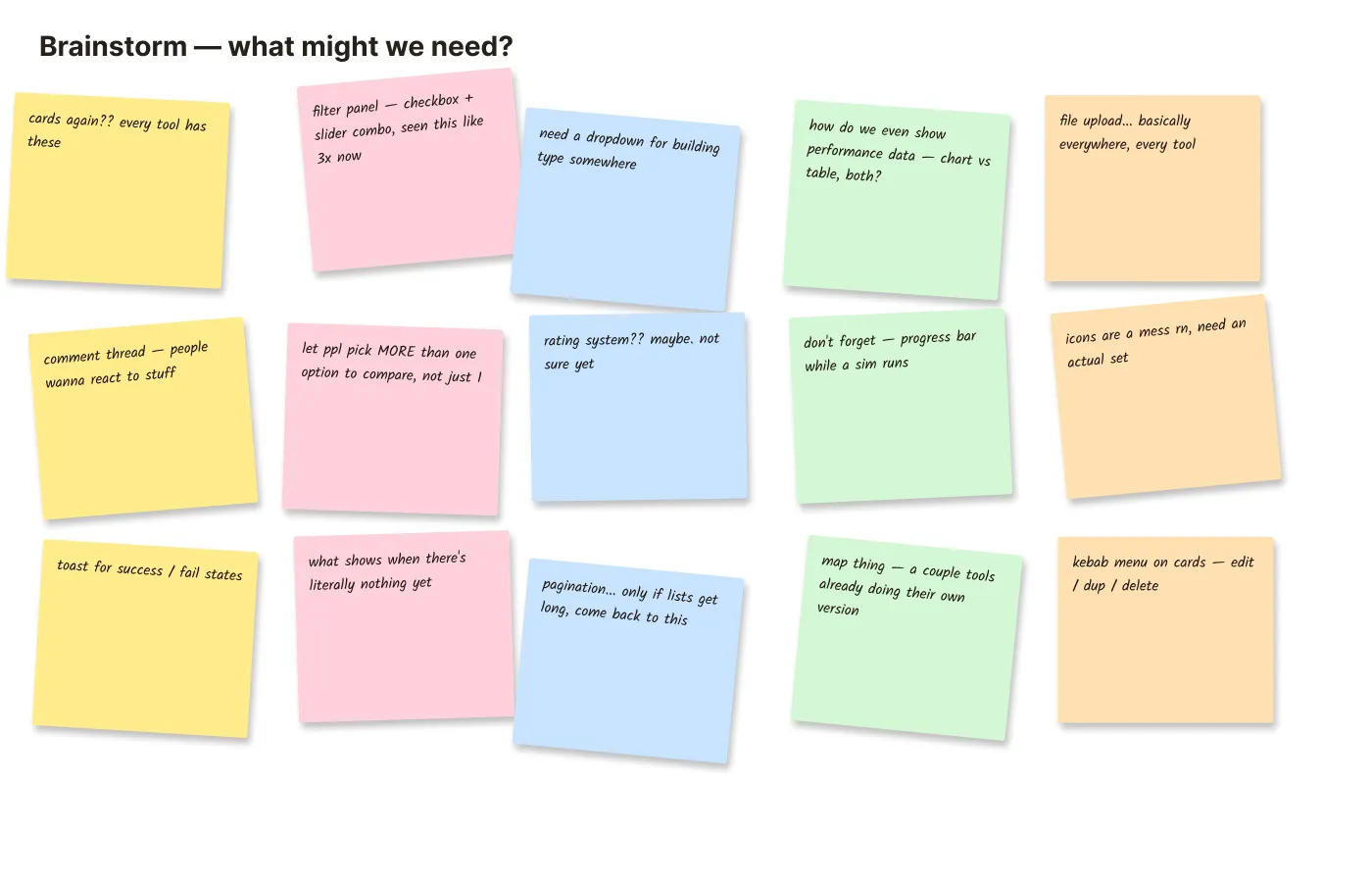
There wasn’t a big discovery phase with interviews and surveys — the best research I had access to was already sitting in front of me. I went through every one of our seven tools myself, screen by screen, and logged every spot where two tools were solving the same interaction problem in a different way: browsing alternatives, filtering by criteria, comparing performance, giving feedback, setting up a run.
One of my teammates had actually run a version of this exercise before, comparing a batch of outside tools against a shared checklist of what good public-facing design tools should do. I did the same thing, just pointed inward at our own suite instead of outward at the market — which felt like the more useful place to start, since that’s where the actual inconsistency was costing us time.
Two mistakes caught by actually checking
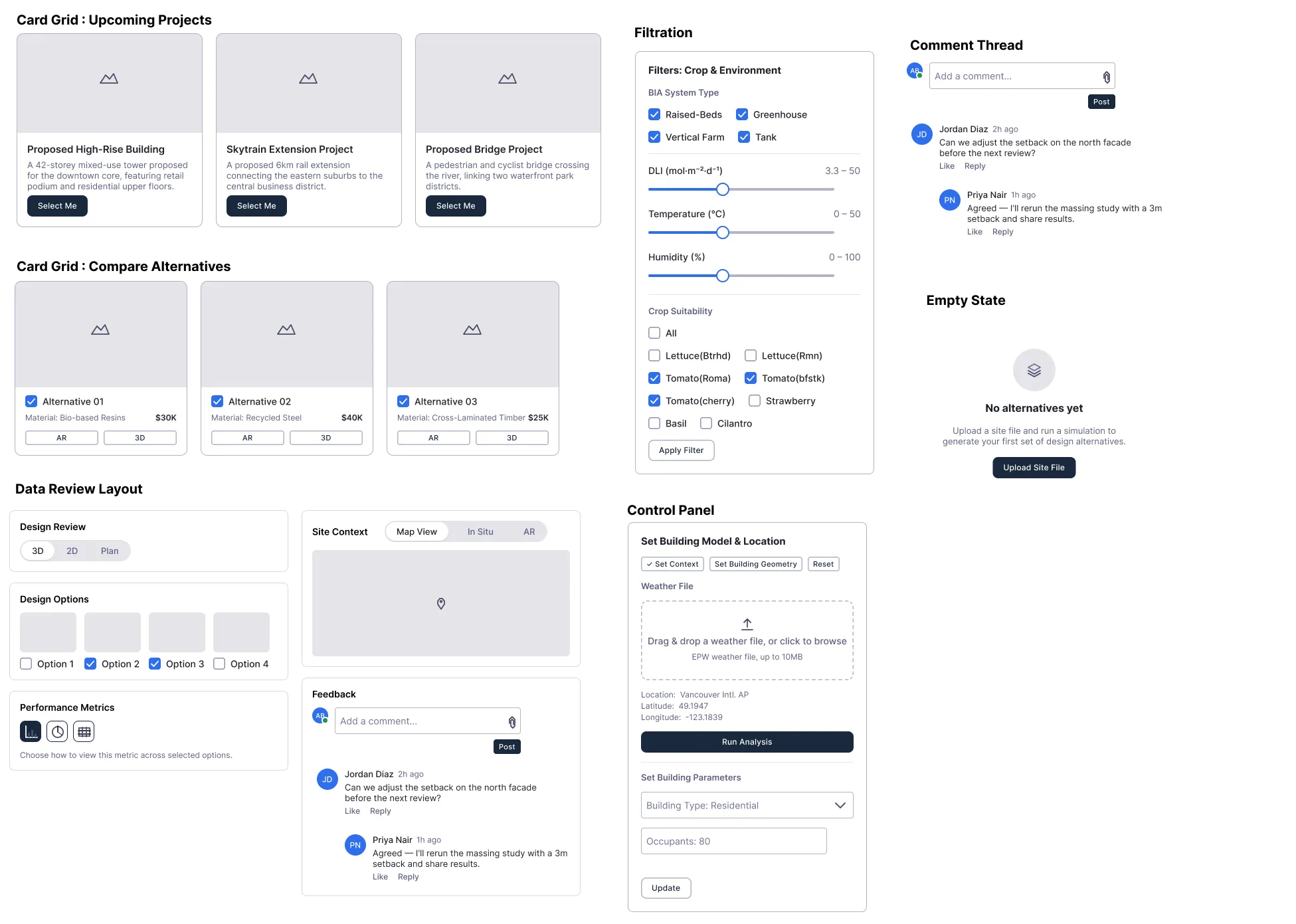
Two of the bigger pieces — the Filter Panel and the Control Panel — were originally built from what a filter panel “should” look like: plausible checkboxes and sliders that I basically invented rather than pulled from a real screen. When I actually went back and checked them against real D-Symbia screenshots, neither one matched. I rebuilt both from the real Setup and Filters tabs — real field names (BIA System Type, DLI, Temperature, Humidity, Crop Suitability), real button labels (Set Context, Set Building Geometry, Run Analysis), nothing invented.
There wasn’t a whiteboard session — there was a lot of second-guessing myself
Since this was solo, “ideation” mostly meant working through a draft, then going back and pressure-testing it against actual evidence before I let myself keep it. That loop is where the whole governing rule of this project came from: atoms can be built broadly, but a molecule or an organism needs a real, repeating pattern behind it, not just plausibility. That one rule ended up cutting two components I’d built on invented patterns, and it changed how I scoped every organism after it.
05. Approach
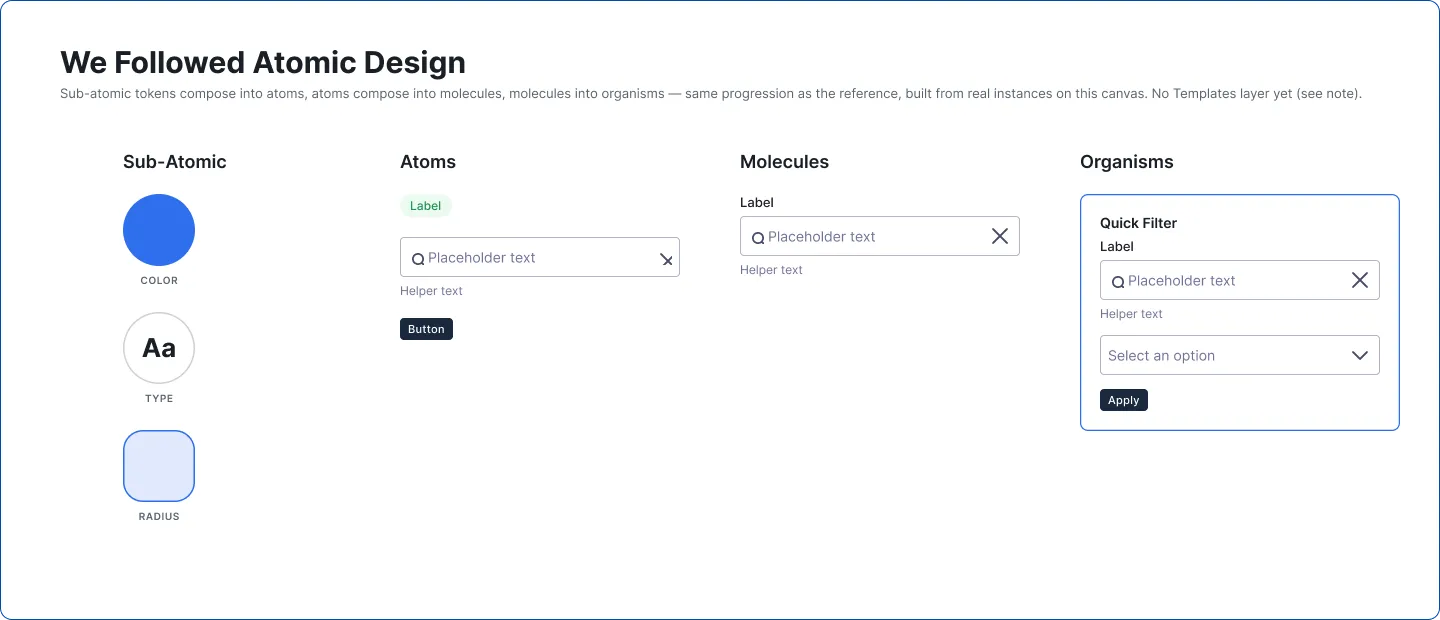
Atoms, molecules, organisms — I used the standard atomic design breakdown, but the textbook version assumes you build every layer out evenly. That doesn’t work for one person with three months. So the rule became: atoms are infrastructure, build them broadly. Anything bigger needs a receipt.
-
Atoms
Button, Checkbox, Dropdown, Slider, Badge, Toast
Built broadly, because every tool needs these no matter what it does.
-
Molecules
Form Field, Search Bar, Menu Item, Card Header
Built where a combination genuinely repeats.
-
Organisms
Filter Panel, Control Panel, Data Review Layout
Built only from a confirmed real screen, never invented.
Before → after, in one small example
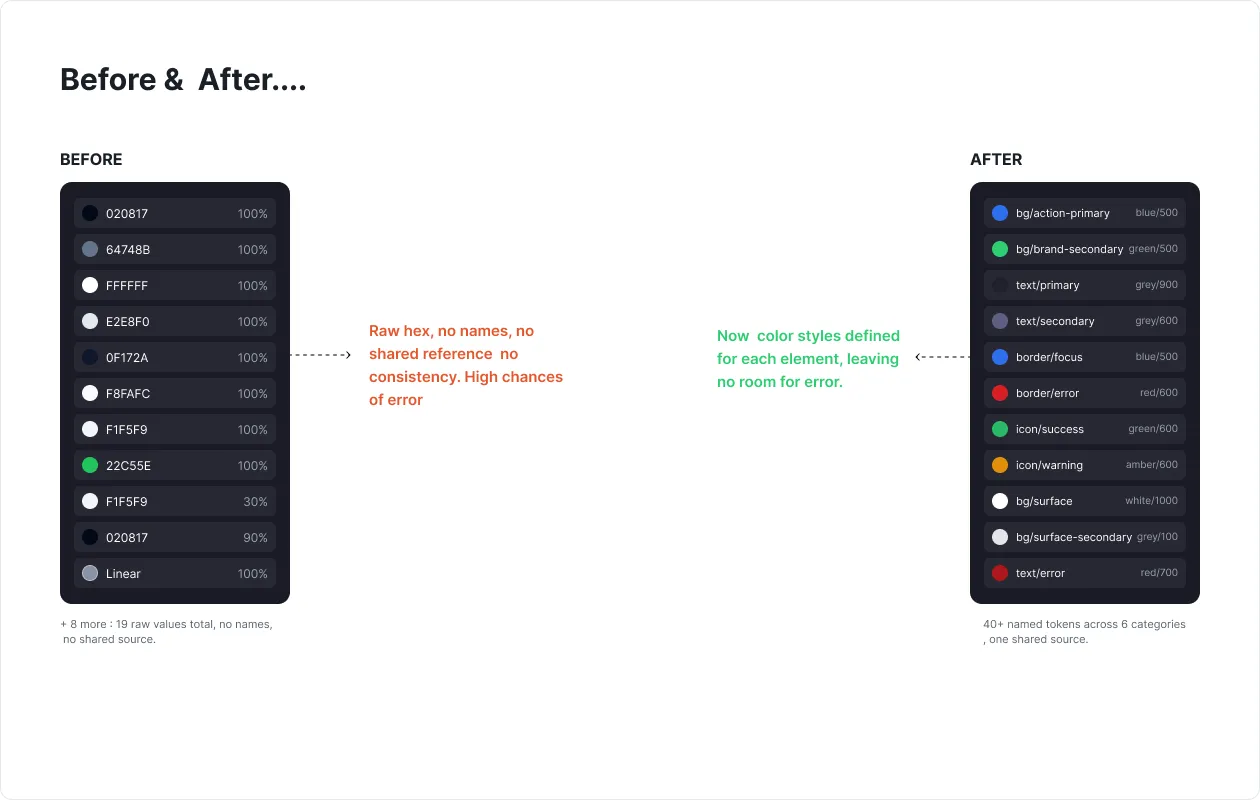
Before — no defined color styles. “Brand color” wasn’t a decision, it was whatever hex value someone happened to paste in — D-Symbia’s dark UI, D-DEM’s purple, D-ART’s blue, three unrelated choices.
After — one bound color token, a single Blue (#2F6FED) as the system’s
brand accent, referenced by every button, link, and focus ring in the library.
Changing the brand color now means changing one variable, not hunting through
seven codebases.
A messier example: turning one crowded screen into reusable parts
D-DEM’s Design Review screen packs a form-review viewport, an option selector, a performance chart, a site map, and a feedback thread into one view. Instead of rebuilding that as one big bespoke layout, I broke it down into smaller, independently reusable pieces — including two I built specifically for this: an Option Thumbnail with a real multi-select checkbox, so someone can compare more than one design option at once instead of only picking one, and a Chart Type Selector so a person picks how they want to view a metric — bar, pie, or table — instead of the chart being hardcoded.
06. Outcomes
This system is newly built — it’s not rolled out across all seven tools yet, so I don’t have usage numbers to show off, and I’d rather say that plainly than make up a graph. What’s real is what got shipped, and the mistakes it caught along the way.
- 46
- Components shipped
- 97
- Icons shipped
- 2
- Components rebuilt
- 2
- Components cut
After checking against real screens
For being ungrounded
What I got wrong
Filter Panel & Control Panel, rebuilt. Both started from a generic filter-panel template, not a real D-Symbia screen. I checked, found the mismatch, and rebuilt both from the actual source.
Stat Tile & the panel built on top of it, cut. A metric-card pattern that looked reasonable but wasn’t grounded in any screen I could point to. When I asked myself twice what it was actually for and couldn’t answer cleanly, I pulled it out — along with the layout built on top of it.
A duplicated file-upload pattern, merged into one. The Control Panel had quietly reinvented a file-upload component that already existed elsewhere. Now there’s one canonical version, not two.
A pie-chart icon that read as a clock face, fixed. A real visual bug I caught on review and corrected at the source.
07. Future-proofing
CAADLAB will keep shipping new tools — that’s the whole point of what the team does. D-ONE lives as shared libraries in Figma, so the next tool someone starts doesn’t reinvent the button: it connects the library and inherits the token system, the components, and the reasoning documented behind each one. The build-atoms-broadly / prove-the-organism rule means the system can keep growing without every new addition needing to be re-justified from scratch — only the genuinely new stuff will.
08. Reflection
What was actually hard about this
-
Auditing seven tools' worth of inconsistency by myself
There was no one to split this with — every screen, across every tool, got reviewed by one person before anything got built.
-
Catching my own invented patterns
Without a second designer around, the only real safeguard against building something plausible-but-wrong was going back and re-checking every organism against a real screenshot — which is exactly how the Filter Panel, Control Panel, and Stat Tile mistakes got caught.
-
Deciding what counts as "universal" under a deadline
Three months is enough to build the basics broadly, but not enough to wait forever for every organism's evidence to show up — some calls had to be made and then revisited as I got further through the audit.
What I learned
A component is only as good as the evidence behind it. That sounds obvious once it’s written down, but it wasn’t obvious in the moment — a checkbox-and-slider filter panel looks so reasonable as “what a filter panel should be” that it took actually pulling up the real D-Symbia screens to notice it was wrong. The thing that saved this project wasn’t cleverness, it was going back and checking my own work.
What I’d do differently
Bring other people in earlier. This was built solo and mostly validated at the end, against my own re-checking. Getting the people behind our other tools — and the developers who’ll actually implement this — involved earlier, instead of after components were already built, would have caught the ungrounded ones sooner and probably surfaced real patterns that are still sitting on my list as “confirmed but not built yet.” Documentation is the other honest gap: the doc explaining the reasoning behind each component works fine at 46 components, but it’s already at the size where it needs a proper way to navigate it, and that only gets harder as the library grows.
D-ONE doesn’t change what any of our tools actually do — D-Symbia still simulates crops, D-DEM still gathers public feedback, D-ART still compares alternatives. What it changes is whether the next tool has to reinvent the button.